
See your organization's licences
The About tab of Settings shows what your organization is licensed for, and details of the platform.
Steps
-
In the sidebar, choose Settings, then the About tab.
-
Under Licensing there is a row for the Platform licence and one for the LMS. Each row says, in order:
- its status: Active, Active — a payment is being retried, Ended or Not licensed;
- where it comes from: Stripe subscription, Manual grant or Evaluation for your organization’s own licence, or Provided by an organization above;
- your tier, Bronze, Silver or Gold, for your own licence only;
- on the LMS row, Learners and Concurrent (see below);
- Since the date the licence began, and Renews (a Stripe subscription), Ends (anything else) or Ended with its date. There is no end date when a licence has no end.

Good to know
- With your own licence, Learners shows how many people hold an enrolment under it, of how many allowed, and Concurrent how many are learning right now, of how many allowed. Unlimited means no limit.
- With a licence from the organization directly above yours, its limits and dates are shown, but not how many people use it. A licence held further up shows no figures or dates at all.
- Your tier is your own licence’s. A licence provided from above gives you no tier of your own.
- Upgrade now appears under the rows when your organization has no tier of its own, or is on an evaluation, and can buy one.
- Platform Information shows the Platform Version: 1, the date the release went live (year, month, day), and the number of the change that went live, for example 1.20260928.364. A test system shows development.
Release notes
Under Platform Information, Release notes lists what changed in each release of Acadenix, newest first.
- Each line shows the date of the release and what it is about.
- Choose + to read the details and the release’s version, and − to fold them away again.
- The newest ten show first. Choose Show older for the ten before them.
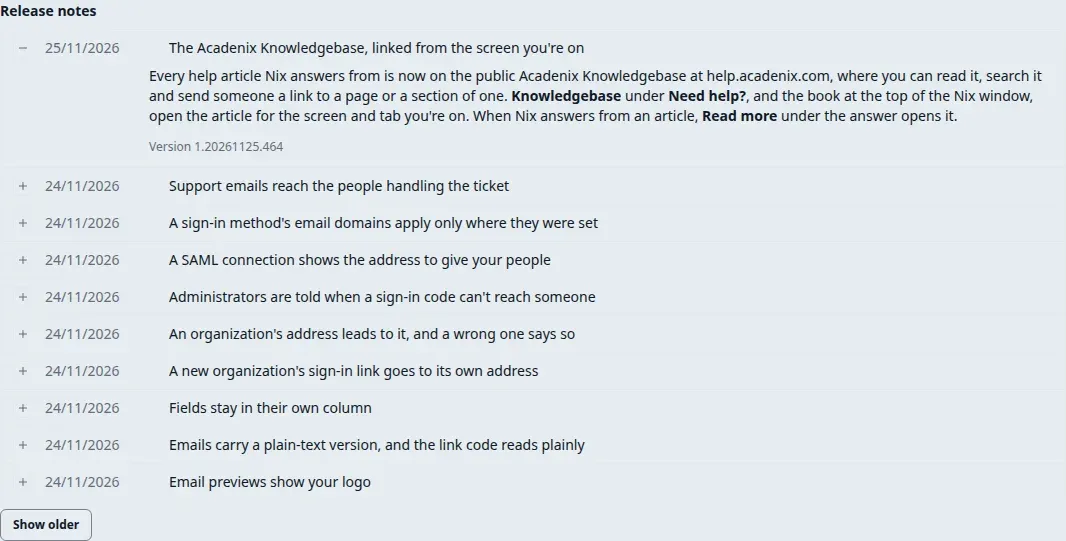
Every administrator sees the same notes, whatever your organization’s plan, so some describe features your plan doesn’t include.
If this didn’t help
Ask Nix to log a support ticket, or open Support under Need help?.
Copyright © 2026 Acadenix.com