
Automate what happens when a learner does something
Available on Silver and Gold
Automated Events act when something happens to a learner: when they register, enrol, complete a course, pass or fail a test, are issued a certificate, or their completion is about to lapse. Each one sends an email, enrols the learner into a course, or sends a webhook to your own system.
Emails and enrolments come with Silver and Gold, webhooks with Gold.
Add an automated event
-
In the sidebar, choose Settings, then the Notifications tab.
-
Under Automated Events, choose Add an automated event.
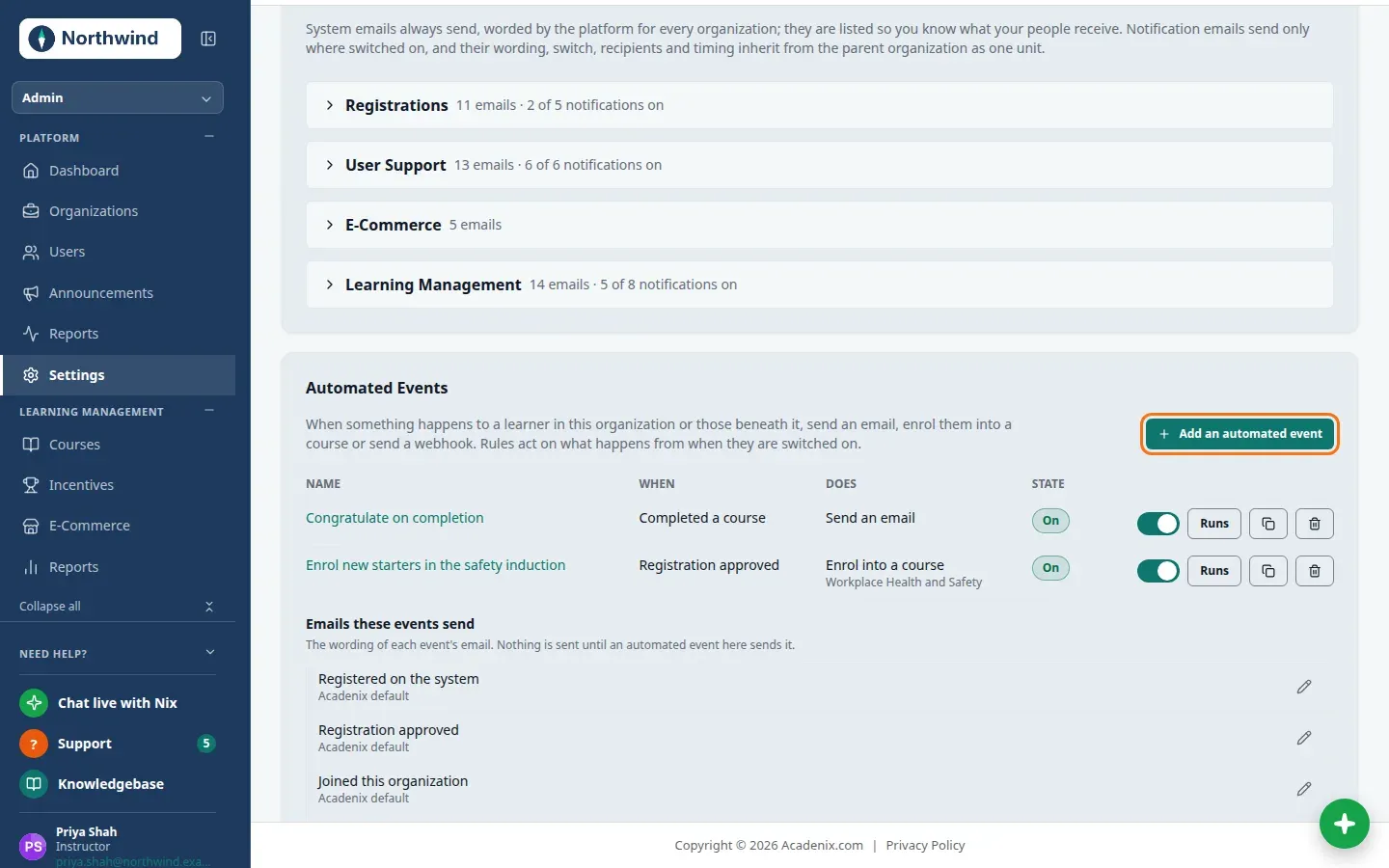
-
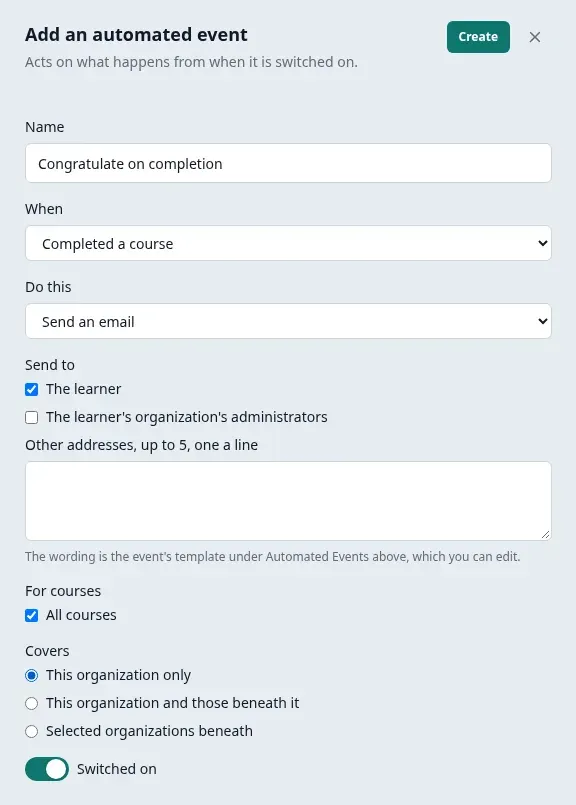
Give it a Name, then choose When:
- Registered on the system, Registration approved, Joined this organization, Archived;
- Enrolled in a course, Completed a course, Passed a test, Failed a test, Certificate issued;
- Completion expiring soon, Completion expired, Didn’t finish in time;
- Training credit low.
-
Choose Do this, and its details:
- Send an email: to the learner, their organization’s administrators, and up to 5 other addresses. The wording is the event’s email in Emails these events send, below your automated events, where you can edit it. The automated event decides who gets it and when, so the email has no switch or recipients of its own.
- Enrol into a course: a course your organization holds. A priced course is paid from your organization’s training credit.
- Send a webhook: an
https://address of your own system.
-
For an event about a course, choose All courses or tick the ones it watches.
-
Under Covers, choose This organization only, This organization and those beneath it, or Selected organizations beneath.
-
Choose Create. For a webhook, copy the signing secret now: it is shown only once.
Good to know
- It acts on what happens from now on. Nothing that happened before the rule was switched on is sent.
- Each rule has Runs: every time it acted in the last 90 days, and what happened: sent, emailed, enrolled, or skipped and why.
- An enrolment is skipped, not forced, when the learner is already enrolled, the course doesn’t reach their organization, there’s no seat, or your organization’s credit can’t pay for it. The learner gets the usual Course enrolled email if that template is on.
- An automated enrolment never sets off other automated events.
- Emails and webhooks send learner details outside Acadenix when they go to an address that isn’t a user’s. The form says so.
- A webhook that keeps failing switches itself off after 20 failed deliveries in a row, and your administrators get one email. Fix your system, then switch the rule on again. Resend on a failed run tries it again; Send test sends a sample.
- If your plan drops, rules that need it pause, and start again when the plan returns. What happened in between is not sent.
- Rules from above are listed as From above: an organization above yours set them, and they act on your learners. You see what they act on, not where they send.
- Copy starts a similar rule, switched off. An organization can have 50 automated events.
Webhooks for developers
Each delivery is a POST of JSON, with these headers:
Acadenix-Event-Id: the same for every try of one event, so you can ignore duplicates.Acadenix-Event-Type, such ascompleted_course.Acadenix-Signature:t=<unix time>,v1=<signature>, where the signature is the hex HMAC-SHA256 of<unix time>.<body>with your secret.
Answer with any 2xx within 10 seconds. Anything else is tried again after
about 1 minute, 5 minutes, 30 minutes, 2 hours, 6 hours and 24 hours.
Redirects aren’t followed. A completion looks like this:
{ "version": 1, "id": "6f1c…", "type": "completed_course", "occurredAt": "2026-10-03T09:30:00+00:00", "organization": { "id": 42, "name": "Harbour Freight" }, "learner": { "id": "9b2e…", "firstName": "Ann", "lastName": "Lee", "email": "ann@example.com", "employeeNumber": "E10442" }, "course": { "id": "c41a…", "code": "FS-1", "name": "Fire Safety" }, "score": 86, "cpdPoints": 1.5}- Certificate issued adds
certificatewith itsreferenceandverifyUrl, andcpdPoints. - Passed a test and Failed a test carry the
score, nevercpdPoints. - Completion expiring soon, Completion expired and Didn’t finish in
time carry the
dueDate. - Training credit low carries
creditwith itsbalanceandthreshold, and no learner. employeeNumberis the learner’s Employee number, ornullwhere it isn’t set.- Send test adds
"test": true.
If this didn’t help
Ask Nix to log a support ticket, or open Support under Need help?.
Copyright © 2026 Acadenix.com