
Price a course, or make it free below you
Available on Silver and Gold
Every course has a Pricing tab. For a course you own, it is in the course editor: open the course and choose Pricing. For a course you receive from above, it is in the course’s slide-out.
To set prices, your organization needs E-Commerce: it is on Silver or Gold with its own Stripe account connected, which turns E-Commerce on unless the organization above has switched it off. Without it, the tab shows what your learners pay.
Two prices
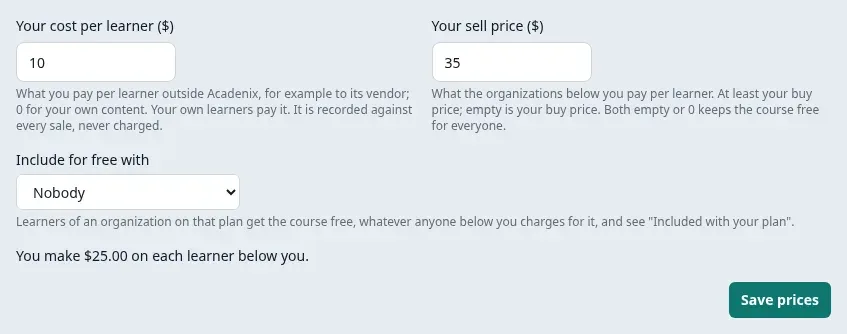
- Your buy price is what your own learners pay. For a course you receive, it starts at what the organization above charges you. You can raise it, but never lower it.
- Your cost per learner takes its place for a course you own. It is what you pay for each learner outside Acadenix, for example to the course’s vendor, and 0 for your own content. Your own learners pay it. It’s recorded against every sale, never charged.
- Your sell price is what the organizations below you pay for each of their learners. It can’t be lower than your buy price. Leave it empty and it is your buy price.
Leave both empty, or 0, on a course you own to keep it free for everyone.
The tab shows what you make on each of your own learners and on each learner below you. Choose Save prices.
Include it with a plan
For a course you own, Include for free with makes it free for learners of any organization on that plan or higher: Bronze and above, Silver and above or Gold. It applies over every price below you, so nobody can charge those learners for it, and they see Included with your plan instead of a price. An organization without a plan of its own uses the plan it draws its licence from. Nobody charges everyone as usual.

Make it free below you
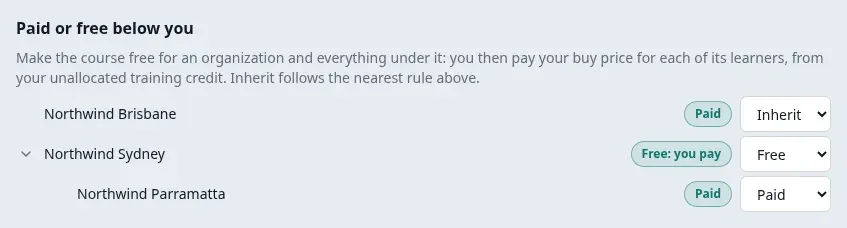
Under Paid or free below you, each organization the course reaches below yours is listed, a level at a time: > opens the organizations beneath one, and shows only when one of them has the course. An organization that doesn’t have the course itself, but has one beneath it that does, reads Doesn’t have this course: open it to reach them. Choose for each:
- Free: nobody there, or below it, pays. Your organization pays for each of their learners instead, at your buy price, from your unallocated training credit. Their catalogue says Free, provided by your organization.
- Paid: they pay their buy price.
- Inherit: follows the nearest rule above it.
An organization that one above yours already makes free shows Free, provided by that organization, and can’t be changed from here.
Good to know
- When your credit runs out, new enrolments in the courses you make free pause, and people already enrolled carry on. Learners there see that the course is not available right now. They resume as soon as you top up.
- You’re warned first: once when your unallocated credit falls below your warning level (USD 100 unless you change it on the Training Credit Settings tab), and once when it reaches zero.
- Switching between Paid and Free changes new enrolments only.
- When the organization above changes its price, your prices don’t change. You’re emailed once that day with what changed. Until you edit your prices, you pay the difference on each sale.
- What you made on each sale is on the Sales tab under E-Commerce: what you received, what it cost you, and your margin.
If this didn’t help
Ask Nix to log a support ticket, or open Support under Need help?.
Copyright © 2026 Acadenix.com