
Set course timers and re-enrolment
Timers set how long learners have to finish a course, how long a completion stays valid, and when they can take the course again. Each is optional: empty means none.
Steps
-
In the sidebar, choose Courses, open the course and choose Timers.
-
Set what you need:
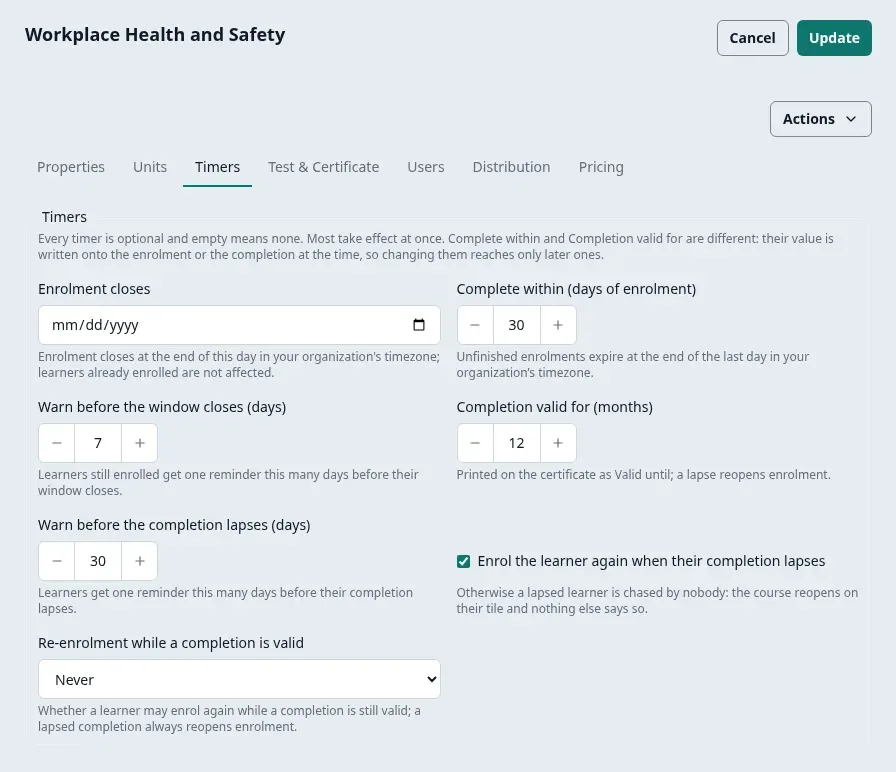
- Enrolment closes: the last day anyone can enrol. At the end of that day the course is archived; learners already enrolled can still finish.
- Complete within (days of enrolment): an unfinished enrolment expires at the end of its last day. The learner can then enrol again and start afresh.
- Warn before the window closes (days): one reminder to learners still working.
- Completion valid for (months): printed on the certificate as Valid until. When it passes, the completion lapses and the learner can enrol again.
- Warn before the completion lapses (days): one reminder before it lapses.
- Enrol the learner again when their completion lapses: shown once a validity is set, and ticked unless you untick it. The learner is enrolled afresh, if the course still admits them, and emailed. Untick it and nobody chases them: the course just reopens for them.
- Re-enrolment while a completion is valid: Never, Immediately, or After N days with Days after completion.
-
Choose Update.
Good to know
- Complete within and Completion valid for are fixed on each enrolment or completion as it happens, so a change reaches only later ones. The editor reminds you when you change them. The other timers take effect at once.
- A warning must come before its timer ends, and needs that timer set.
- Completions are final. Nobody can reset a completed course. Taking it again is a new enrolment with fresh progress, when the settings above allow it; the earlier completion and certificate stay on record. Learners do this with Re-Enroll on the course.
- Timers belong to the course. Only the organization that owns it sets them, and they apply in every organization that receives it.
- Restoring an archived course whose Enrolment closes date has passed asks you to clear the date or choose a later one.
If this didn’t help
Ask Nix to log a support ticket, or open Support under Need help?.
Copyright © 2026 Acadenix.com